Download on the Mac App Store
Description
Desktok for TikTok is the native Mac app for everyone who watches TikTok — and everyone who wants their next video to go viral.
Watch in a calm, focused window. Save the videos that catch your eye. Let Apple Intelligence read your saves on-device and tell you why each one works. Then generate brand-new viral ideas built from YOUR data, not generic AI prompts.
FOR ANYONE WHO WATCHES TIKTOK
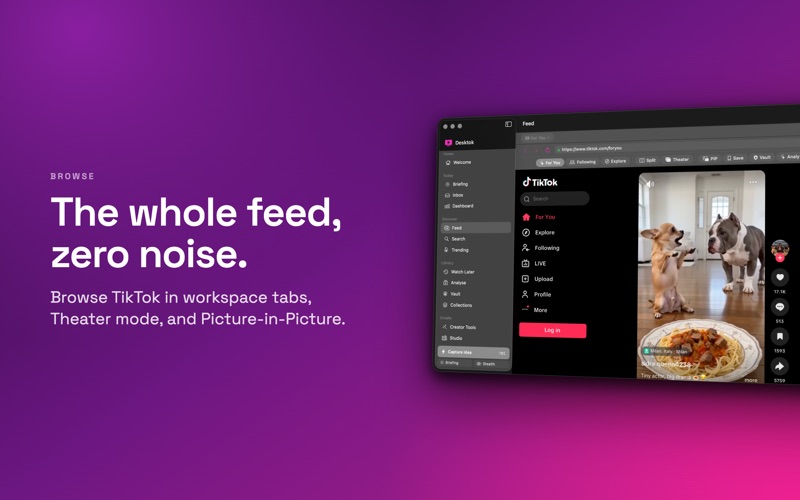
- Workspace tabs — keep multiple TikTok pages open at once
- Picture-in-Picture — pop the video out and keep watching while you work
- Theater mode — hide everything except the video
- Split feed — two TikTok feeds side-by-side in the same window
- Stealth mode — hide Desktok from screen recording in one click
- Multi-profile — separate cookie jars for Personal, Work, Research
- Menu bar item — quick save, search, and recent videos from anywhere
FOR ANYONE WHO CREATES
- Apple Intelligence reads every save and extracts niche, mood, hook type, content format, target audience, viral score, why-it-works
analysis, and a repurpose angle
- Statistics dashboard — Swift Charts of niches, moods, formats, viral score distribution
- Viral Suggestions — AI generates brand-new video concepts grounded in your saves
- Studio creator hub — hashtag packs, caption templates, hook library, sound bookmarks, script archive with versioning, content calendar,
series tracker, idea inbox
- AI Creator Tools — scripts, captions, hashtags, idea batches with persona-aware tone
TWO WAYS TO SAVE
- Watch Later — fast plaintext queue for everything you save
- Vault — AES-GCM 256-bit encrypted library gated by Touch ID. Collections inside the Vault can have an extra-lock layer.
100% PRIVATE, 100% ON-DEVICE
- No analytics. No accounts. No tracking. Ever.
- All AI runs on your Mac via Apple Intelligence — your prompts and saves never leave the device.
- Zero third-party AI providers (no OpenAI, no Anthropic, no Google).
- Sandboxed + Hardened Runtime.
NATIVE MAC FEATURES
- Full keyboard navigation (⌘1–9 for sections, ⌥⌘ global hotkeys)
- Spotlight indexing for your library
- Shortcuts.app integration with App Intents
- Markdown + PDF export for scripts
- macOS Reminders integration for the content calendar
System Requirements: macOS 14 or later. Apple Intelligence features require an Apple Silicon Mac (M1 or newer) running macOS 26 with Apple Intelligence enabled.
Need help? gavcri.help@gmail.com
PRICING & SUBSCRIPTIONS (prices may vary by location or active promotions)
- Lifetime — from $19.99, one-time purchase. Use forever, no extra charges.
- Yearly — $14.99, includes 3-day free trial. Auto-renews yearly unless canceled.
- Monthly — $4.99. Auto-renews monthly unless canceled.
Payment is charged to your iTunes Account at confirmation of purchase. Subscriptions auto-renew unless canceled at least 24 hours before the renewal date. Manage in Settings > Apple ID > Subscriptions. The lifetime license is a one-time purchase, not a subscription.
The application is not free — purchase via Apple In-App.
Privacy Policy: https://gavcris.app/privacy.html
Terms of Use: https://gavcris.app/terms.html
TikTok, the TikTok logo, and related marks are trademarks of TikTok Ltd. and ByteDance Ltd. Desktok is an independent application and is not affiliated with, endorsed by, or sponsored by TikTok Ltd. or ByteDance Ltd.
Screenshots